API Dokumentation
Named Entity Recognition für deutsche Geschäftsdokumente
https://api.anonquick.com/api/v1/
Schnellstart
- API-Key im Dashboard erstellen
- Key als Bearer Token im Authorization Header senden
- POST Request an gewünschten Endpoint senden
Unterstützte Entity-Typen
| Typ | Beschreibung | Beispiel |
|---|---|---|
| PER | Personennamen | Max Mustermann |
| ORG | Organisationen | Deutsche Bahn |
| LOC | Orte | Deutschland |
| E-Mail-Adressen | info@firma.de | |
| PHONE | Telefonnummern | +49 171 1234567 |
| VAT_ID | USt-IdNr. | DE123456789 |
| POSTAL_CODE | Postleitzahlen | 80331 |
| CITY | Städte | München |
| STREET | Straßen | Königsturmstraße 5 |
| COMPANY_NAME | Firmennamen | SETU GmbH |
| WEBSITE | URLs | www.firma.de |
| Type | Description | Example |
|---|---|---|
| PERSON | Person names | John Smith |
| ORG | Organizations | Apple Inc. |
| GPE | Countries, cities | United States |
| Email addresses | john@example.com | |
| PHONE | Phone numbers | +1-555-123-4567 |
| DATE | Dates | January 1st, 2024 |
| MONEY | Money | $100 |
| WEBSITE | URLs | https://example.com |
Authentifizierung
Alle API-Anfragen benötigen einen Bearer Token im Authorization Header.
Authorization: Bearer YOUR_API_KEYText-Verarbeitung
Erkennung und Anonymisierung von Entitäten in deutschen Geschäftstexten.
Extract named entities from text with position information and confidence scores. Includes advanced German business entity detection.
Enhanced German Business Detection
Detects emails, phone numbers, German streets, cities, VAT IDs, postal codes, and company names beyond standard spaCy entities.
Request Parameters
| Field | Type | Required |
|---|---|---|
text | String | ✓ |
model | String | Optional |
apply_input_cleanup | Boolean | Optional |
Response Structure
{
  "entities": [
    {
      "text": "Max Mustermann",
      "label": "PER",
      "start": 0,
      "end": 14
    }
  ],
  "entity_count": 5,
  "cost": 0.00163,
  "exec_time": 885
}
Example: German Business Text
curl -X POST https://api.anonquick.com/api/v1/text/extract-entities \
  -H "Authorization: Bearer YOUR_API_KEY" \
  -H "Content-Type: application/json" \
  -d '{
    "text": "Max Mustermann arbeitet bei ABC GmbH in München. Email: max@mustermann.de, Tel: +49 89 123456",
    "apply_input_cleanup": true
}'Gibt Text mit Zeichenzahl und Wortzahl zurück. Konsistent mit /pdf/extract-text.
Request Parameters
| Field | Type | Required |
|---|---|---|
text | String | ✓ |
Response Structure
{
  "success": true,
  "text": "Der übergebene Text...",
  "character_count": 1250,
  "word_count": 210,
  "cost": 0.00125,
  "credits_used": 1625,
  "exec_time": 5
}Replace named entities in text with custom anonymization patterns for GDPR compliance and business document processing.
GDPR Compliant Anonymization
Professional text anonymization with intelligent cleanup for German business documents. Supports [NAME] placeholders and clean tilde consolidation.
Request Parameters
| Field | Type | Required |
|---|---|---|
text | String | ✓ |
entity_set | String | GDPR oder ALL |
model | String | Optional (default: de_core_news_sm) |
unique_keys | Boolean | Optional (default: true) |
apply_input_cleanup | Boolean | Optional (default: true) |
apply_output_cleanup | Boolean | Optional (default: true) |
ner_tracking | Boolean | Optional (default: false) - Request für Qualitätsanalyse speichern |
entity_set: GDPR = Personen, E-Mail, Telefon, IBAN, Passwort. ALL = inkl. Org, Ort, Datum, Straße, PLZ, etc.
Response Structure
{
  "modified_text": "[NAME_1] arbeitet bei ~ in ~. Email: [EMAIL_1]",
  "entities_found": 5,
  "replacements_made": 5,
  "replacement_map": {"[NAME_1]": "Max Mustermann", ...},
  "cost": 0.00163,
  "exec_time": 885
}
Example: German Business Anonymization (Unified)
curl -X POST https://api.anonquick.com/api/v1/text/redact-entities \
  -H "Authorization: Bearer YOUR_API_KEY" \
  -H "Content-Type: application/json" \
  -d '{
    "text": "Max Mustermann arbeitet bei ABC GmbH in München. Email: max@mustermann.de, Tel: +49 89 123456",
    "entity_set": "GDPR"
}'Token-optimierte Text-Anonymisierung. Gibt nur den anonymisierten Text und essenzielle Metadaten zurück. Ideal für Workflow-Automation.
Request Parameters
| Field | Type | Required |
|---|---|---|
text | String | ✓ |
entity_set | String | GDPR oder ALL |
model | String | Optional (default: de_core_news_sm) |
unique_keys | Boolean | Optional (default: true) |
ner_tracking | Boolean | Optional (default: false) - Für Qualitätsanalyse speichern |
Response Structure
{
  "success": true,
  "redacted_text": "[NAME_1] arbeitet bei ~...",
  "original_text": "Max Mustermann arbeitet bei...",
  "entity_count": 5,
  "replacements_made": 5,
  "replacement_map": {"[NAME_1]": "Max Mustermann"},
  "cost": 0.00163,
  "credits_used": 1250,
  "exec_time": 85
}
Example: Token-Optimized Request
curl -X POST https://api.anonquick.com/api/v1/text/redact-text \
  -H "Authorization: Bearer YOUR_API_KEY" \
  -H "Content-Type: application/json" \
  -d '{
    "text": "Max Mustermann arbeitet bei ABC GmbH. Email: max@test.de",
    "entity_set": "GDPR"
  }'
PDF Processing Endpoints
Professional PDF document anonymization with AI agent optimization for searchable PDFs.
AI Agent Token Optimization
Use URL input/output instead of base64 to reduce token usage by 90%+. Perfect for n8n, Zapier, and Make.com workflows.
Extract named entities from PDF files with page-level mapping and position information. Supports URL input for AI agents.
AI Agent Optimized
Use "url": "https://example.com/document.pdf" for input to drastically reduce token usage instead of base64.
Request Parameters
| Field | Type | Required |
|---|---|---|
file | PDF File | ✓ (or url) |
url | String | ✓ (or file) |
model | String | Optional |
Response Structure
{
  "success": true,
  "page_count": 2,
  "entity_count": 15,
  "page_entities": {
    "1": [...],
    "2": [...]
  },
  "cost": 0.0125,
  "exec_time": 145
}
Example: URL Input (AI Agents)
curl -X POST https://api.anonquick.com/api/v1/pdf/extract-entities \
  -H "Authorization: Bearer YOUR_API_KEY" \
  -H "Content-Type: application/json" \
  -d '{
    "url": "https://example.com/document.pdf"
  }'
Example: Form-Data Upload
curl -X POST https://api.anonquick.com/api/v1/pdf/extract-entities \
  -H "Authorization: Bearer YOUR_API_KEY" \
  -F "file=@document.pdf" \
-F "model=de_core_news_sm"Professional PDF anonymization with black rectangle redaction and AI agent optimization for searchable PDFs.
Professional Visual Redaction
Uses solid black rectangles over detected entities for industry-standard document anonymization that meets GDPR compliance requirements.
AI Agent Token Optimization
Input: "url": "https://example.com/document.pdf" statt Base64 reduziert Token-Verbrauch erheblich. Nutze output_format: "file" für direkten PDF-Download.
/pdf/redact-text statt dieses Endpoints. Dieser Endpoint ist für visuelle Archivierung (schwarze Balken).
Request Parameters
| Field | Type | Description |
|---|---|---|
file | PDF File | PDF als Datei-Upload (FormData) |
b64 | Base64 | Alternative: PDF als Base64-String |
url | String | Alternative: URL zur PDF-Datei |
entity_set | String | GDPR (default) oder ALL |
output_format | String | b64 (default), file |
include_info_page | Boolean | Info-Seite anhängen (default: true) |
test_mode | Boolean | Roter Durchstrich statt Schwärzung (default: false) |
ner_tracking | Boolean | NER-Logging für Optimierung (default: false) |
session_id | String | Session-ID für Fortsetzung |
ttl_minutes | Integer | Session-TTL in Minuten (max: 1440) |
unique_keys | Boolean | Eindeutige Ersetzungen (default: true) |
passthrough | Any | Durchreichung für n8n/Workflows |
file, b64, oder url
Output Format Options
- b64 Base64 JSON response (default)
- file Direct PDF download
Response (b64)
{
  "pdf_data": "JVBERi0xLjQK...",
  "redacted_text": "Anonymisierter Text",
  "original_text": "Original Text",
  "entities_found": 12,
  "replacements_made": 12,
  "replacement_log": [...],
  "replacement_map": {...},
  "cost": 2500,
  "credits_used": 2500,
  "exec_time": 245,
  "session_id": "abc123",
  "session_continued": false,
  "message_count": 1,
  "include_info_page": true
}
Example: Datei-Upload (FormData - empfohlen für Test-UI)
curl -X POST https://api.anonquick.com/api/v1/pdf/redact-pdf \
  -H "Authorization: Bearer YOUR_API_KEY" \
  -F "file=@document.pdf" \
  -F "entity_set=GDPR" \
  -F "model=auto"
Example: URL Input/Output (AI Agents)
curl -X POST https://api.anonquick.com/api/v1/pdf/redact-pdf \
  -H "Authorization: Bearer YOUR_API_KEY" \
  -H "Content-Type: application/json" \
  -d '{
    "url": "https://example.com/document.pdf",
    "entity_set": "GDPR"
  }'
Example: Base64 Input/Output (n8n)
curl -X POST https://api.anonquick.com/api/v1/pdf/redact-pdf \
  -H "Authorization: Bearer YOUR_API_KEY" \
  -H "Content-Type: application/json" \
  -d '{
    "b64": "JVBERi0xLjQKJeLjz9MKM...",
    "entity_set": "GDPR",
    "output_format": "b64"
  }'
Response (b64)
{
  "success": true,
  "pdf_data": "JVBERi0xLjQKJeLjz9MKM...",
  "filename": "redacted_document.pdf",
  "entities_found": 12,
  "replacements_made": 12,
  "cost": 0.025,
  "exec_time": 245
}
Example: DSGVO/GDPR Complete Anonymization
DSGVO/GDPR Compliance
Use "ALL": "~" to anonymize all personal data types with a single parameter for complete GDPR compliance.
curl -X POST https://api.anonquick.com/api/v1/pdf/redact-pdf \
  -H "Authorization: Bearer YOUR_API_KEY" \
  -H "Content-Type: application/json" \
  -d '{
    "b64": "JVBERi0xLjQKJeLjz9MKM...",
    "entity_set": "ALL",
    "output_format": "b64"
}'Token-optimized PDF redaction that returns only anonymized text instead of PDF files. Perfect for AI workflows and automation platforms. Chat-Session Support
Request Parameters
| Field | Type | Required |
|---|---|---|
file | PDF File (Base64) | ✓ (or url) |
url | String | ✓ (or file) |
entity_set | String | GDPR oder ALL |
model | String | Optional (default: de_core_news_sm) |
session_id | String | Optional: Session fortsetzen |
ttl_minutes | Integer | Session-TTL (1-1440, Default: 30) |
unique_keys | Boolean | Optional (default: true) |
ner_tracking | Boolean | Optional (default: false) - Für Qualitätsanalyse speichern |
entity_set: Vereinheitlicht mit /llm/preproc. GDPR oder ALL.
Response Structure
{
  "redacted_text": "[NAME_1] arbeitet bei...",
  "original_text": "Max Mustermann arbeitet bei...",
  "entities_found": 5,
  "replacements_made": 5,
  "cost": 2500,
  "credits_used": 2500,
  "exec_time": 245,
  "replacement_log": [...],
  "replacement_map": {"[NAME_1]": "Max"},
  "session_id": "uuid-für-chat",
  "session_continued": false,
  "message_count": 1,
  "total_entities_in_session": 5,
  "note": "Text-only output..."
}
Example: AI Agent Token Optimization (Unified)
curl -X POST https://api.anonquick.com/api/v1/pdf/redact-text \
  -H "Authorization: Bearer YOUR_API_KEY" \
  -H "Content-Type: application/json" \
  -d '{
    "url": "https://example.com/document.pdf",
    "entity_set": "GDPR"
}'session_id aus der PDF-Response kann an /llm/preproc übergeben werden. So bleiben Entities wie "Klaus" im PDF und "klaus" im Chat-Text konsistent als [NAME_1].
Extract plain text from PDF documents without entity analysis. Useful for text preprocessing or content analysis.
Request Parameters
| Field | Type | Required |
|---|---|---|
file | PDF File | ✓ (or url) |
url | String | ✓ (or file) |
Response Structure
{
  "success": true,
  "text": "Extracted text content...",
  "page_count": 3,
  "total_characters": 1245,
  "cost": 0.0075,
  "exec_time": 89
}
Example: URL Input
curl -X POST https://api.anonquick.com/api/v1/pdf/extract-text \
  -H "Authorization: Bearer YOUR_API_KEY" \
  -H "Content-Type: application/json" \
  -d '{"url": "https://example.com/document.pdf"}'
LLM Processing WORKFLOW
Pre- und Post-Processing Endpunkte für LLM-Workflow-Integration. Anonymisieren vor der AI, wiederherstellen nach der Verarbeitung.
Workflow-Ablauf
Anonymisiert Text bevor er an ein LLM gesendet wird. Gibt nummerierte Platzhalter wie [PERSON_1], [EMAIL_1] zurück und eine Session-ID zur Wiederherstellung.
Request Parameter
| Parameter | Typ | Standard | Beschreibung |
|---|---|---|---|
texts | Object | - | Erforderlich. Object mit benannten Keys, z.B. {"subject": "...", "content": "..."}. Response gibt anonymized_texts mit denselben Keys zurück. |
session_id | String | - | Chat-Session Session-ID aus vorherigem Aufruf. Ermöglicht konsistentes Mapping über mehrere Nachrichten (z.B. "Max Müller" bleibt immer [NAME_1]). |
entity_set | String | GDPR | Entitäts-Set: GDPR (Personen, E-Mail, Telefon, IBAN, Passwort) oder ALL (inkl. Org, Ort, Datum, Straße, PLZ, etc.) |
ttl_minutes | Integer | 30 | Session-Lebensdauer in Minuten (1-1440, max 24h). Bei Fortsetzung wird Ablaufzeit erneuert (Sliding Expiration). |
convert_html | String/Bool | auto | HTML zu Plaintext konvertieren: auto (automatische Erkennung), true (immer), false (nie). Reduziert Token-Kosten erheblich. |
passthrough | Any | - | Beliebige Daten die unverändert in der Response zurückgegeben werden (z.B. E-Mail-ID, Workflow-State). |
ner_tracking | Boolean | false | Request für NER-Qualitätsanalyse in Datenbank speichern. Nur für Test-/Debugging-Zwecke aktivieren. |
Optimiert für AI - behält Kontext für besseres Verständnis:
[PERSON], [EMAIL], [PHONE], [IBAN], [PASSWORD]
Maximale Anonymisierung - alle erkannten Entitäten:
[PERSON], [ORG], [LOCATION], [EMAIL], [PHONE], [IBAN], [VAT_ID], [PASSWORD], [WEBSITE], [POSTAL_CODE], [STREET], [CITY], [TITLE_NAME], [DATE], [MONEY]
Response
{
  "success": true,
  "session_id": "f47ac10b-58cc-4372-a567-0e02b2c3d479",
  "anonymized_texts": {
    "subject": "Anfrage von [NAME_1]",
    "content": "Hallo, [NAME_1] ([EMAIL_1]) bittet um..."
  },
  "entities_found": 5,
  "replacements_made": 3,
  "expires_in_minutes": 30,
  "cost": 2500,
  "credits_used": 1350,
  "credits_remaining": 48650000,
  "calls_used": 1,
  "exec_time": 45,
  "session_continued": false,
  "message_count": 1,
  "total_entities_in_session": 2
}
Chat-Session Unterstützung
Für Chatverläufe mit konsistentem Entity-Mapping:
- Erste Nachricht: Ohne
session_idsenden → erhält neue Session-ID - Folgenachrichten: Mit
session_idsenden → bestehendes Mapping wird wiederverwendet - Beispiel: "Max Müller" wird in allen Nachrichten konsistent zu
[NAME_1]
Beispiele
E-Mail mit Subject + Content:
curl -X POST https://api.anonquick.com/api/v1/llm/preproc \
  -H "Authorization: Bearer YOUR_API_KEY" \
  -H "Content-Type: application/json" \
  -d '{
    "texts": {
      "subject": "Anfrage von Max Müller",
      "content": "Herr Müller (max.mueller@firma.de) bittet um Rückruf."
    },
    "entity_set": "GDPR"
  }'
n8n Expression (HTML-E-Mail):
{
  "texts": {
    "subject": {{ $json.subject.toJsonString() }},
    "content": {{ $json.body.toJsonString() }}
  },
  "convert_html": "auto",
  "entity_set": "GDPR"
}
Chat-Session fortsetzen:
curl -X POST https://api.anonquick.com/api/v1/llm/preproc \
  -H "Authorization: Bearer YOUR_API_KEY" \
  -H "Content-Type: application/json" \
  -d '{
    "session_id": "f47ac10b-58cc-4372-a567-0e02b2c3d479",
    "texts": {
      "message": "Max Müller hat noch eine Frage zu seinem Vertrag."
    }
  }'
// Max Müller wird wieder zu [NAME_1] (wie in vorheriger Nachricht)session_id: null zurückgegeben wird, wurden keine Entitäten gefunden. Der Text kann trotzdem verarbeitet werden - beim Postproc einfach dieselbe session_id: null übergeben.
Stellt die Originaldaten in LLM-verarbeiteten Texten wieder her. Ersetzt Platzhalter wie [PERSON_1] mit den in der Session gespeicherten Originalwerten.
texts Object Format (wie preproc)
Input: {"texts": {"subject": "...", "content": "..."}}
Output: {"restored_texts": {"subject": "...", "content": "..."}}
Request Parameter
| Parameter | Typ | Standard | Beschreibung |
|---|---|---|---|
session_id | String | - | Erforderlich. Die Session-ID vom Preproc-Aufruf. Bei leer wird Input unverändert zurückgegeben. |
texts | Object | - | Erforderlich. Object mit benannten Keys (wie bei preproc). Alle String-Werte werden rekursiv de-anonymisiert. |
delete_session | Boolean | true | Session nach Verarbeitung löschen. Bei false bleibt die Session bis TTL-Ablauf erhalten. |
passthrough | Any | null | Beliebige Daten, die unverändert in der Response zurückgegeben werden (Workflow-Kontext). |
Response Beispiel
{
  "success": true,
  "restored_texts": {
    "subject": "Anfrage von Max Müller - Termin",
    "content": "Herr Max Müller (max.mueller@firma.de, +49 89 12345) hat..."
  },
  "replacements_made": 5,
  "session_deleted": true,
  "source": "memory"
}
Beispiele
Standard (E-Mail mit subject/content):
curl -X POST https://api.anonquick.com/api/v1/llm/postproc \
  -H "Authorization: Bearer YOUR_API_KEY" \
  -H "Content-Type: application/json" \
  -d '{
    "session_id": "f47ac10b-58cc-4372-a567-0e02b2c3d479",
    "texts": {
      "subject": "Anfrage von [NAME_1] - Termin",
      "content": "Sehr geehrter [NAME_1], Ihre Anfrage wurde bearbeitet."
    }
  }'
AI-Agent Output (erweiterte Struktur):
curl -X POST https://api.anonquick.com/api/v1/llm/postproc \
  -H "Authorization: Bearer YOUR_API_KEY" \
  -H "Content-Type: application/json" \
  -d '{
    "session_id": "f47ac10b-58cc-4372-a567-0e02b2c3d479",
    "texts": {
      "summary": "[NAME_1] benötigt Hilfe mit dem Vertrag",
      "suggested_reply": "Sehr geehrter [NAME_1], wir kümmern uns um Ihr Anliegen.",
      "priority": "high"
    }
  }'
Mit passthrough für Workflow-Kontext:
curl -X POST https://api.anonquick.com/api/v1/llm/postproc \
  -H "Authorization: Bearer YOUR_API_KEY" \
  -H "Content-Type: application/json" \
  -d '{
    "session_id": "f47ac10b-58cc-4372-a567-0e02b2c3d479",
    "texts": {"content": "Antwort für [NAME_1]"},
    "delete_session": false,
    "passthrough": {"email_id": "msg123", "step": 5}
  }'
n8n/Make.com Integration
In Workflow-Automation-Tools wie n8n oder Make.com:
- Preproc Node: E-Mail-Body an
/llm/preprocsenden →session_id+anonymized_texterhalten - AI Agent Node:
anonymized_textan OpenAI/Claude senden → Antwort als JSON erhalten - Postproc Node:
session_id+ AI-Output alsdataan/llm/postprocsenden → personalisierte Antwort erhalten
Fehler-Codes
| HTTP | Bedeutung |
|---|---|
404 | Session nicht gefunden (bereits abgelaufen oder falsche ID) |
403 | Session gehört zu einem anderen API-Key |
410 | Session abgelaufen (TTL überschritten) |
Automation Integration
Kompletter n8n Workflow für E-Mail-Anonymisierung mit AI-Integration.
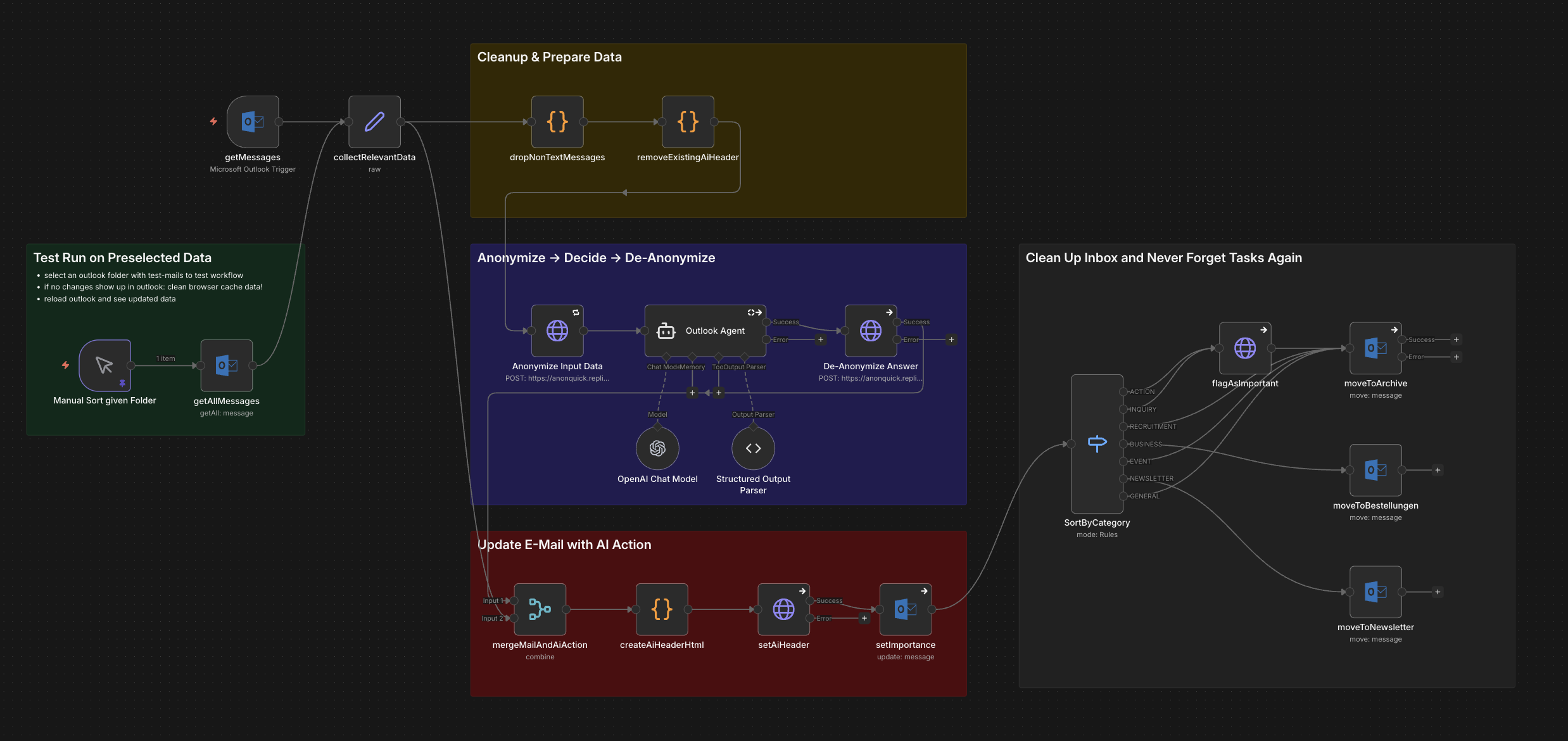
E-Mail Anonymisierung mit n8n & AI
Dieser Workflow zeigt die komplette Integration von AnonQuick in einen n8n E-Mail-Automatisierungsworkflow:
- Anonymize Input Data: E-Mail-Inhalte werden vor der AI-Verarbeitung anonymisiert
- AI Agent Processing: OpenAI verarbeitet die anonymisierten Daten sicher
- De-Anonymize Answer: Die AI-Antwort wird mit den Originaldaten re-personalisiert
- Inbox Cleanup: Automatische Kategorisierung und Archivierung
Quick Setup
- Workflow-JSON herunterladen und in n8n importieren
- AnonQuick API-Key im Dashboard erstellen
- API-Key als "Header Auth" Credential in n8n einrichten (Authorization: Bearer YOUR_KEY)
- E-Mail-Verbindung (Outlook/Gmail) konfigurieren
- OpenAI API-Key hinzufügen - fertig!